
A Picture Equals a Thousand Bookings: How Professional Photos Impact Travel Promotion
Get €600 for flight issues. No win, no fee. Simple.
Click here to claim now!
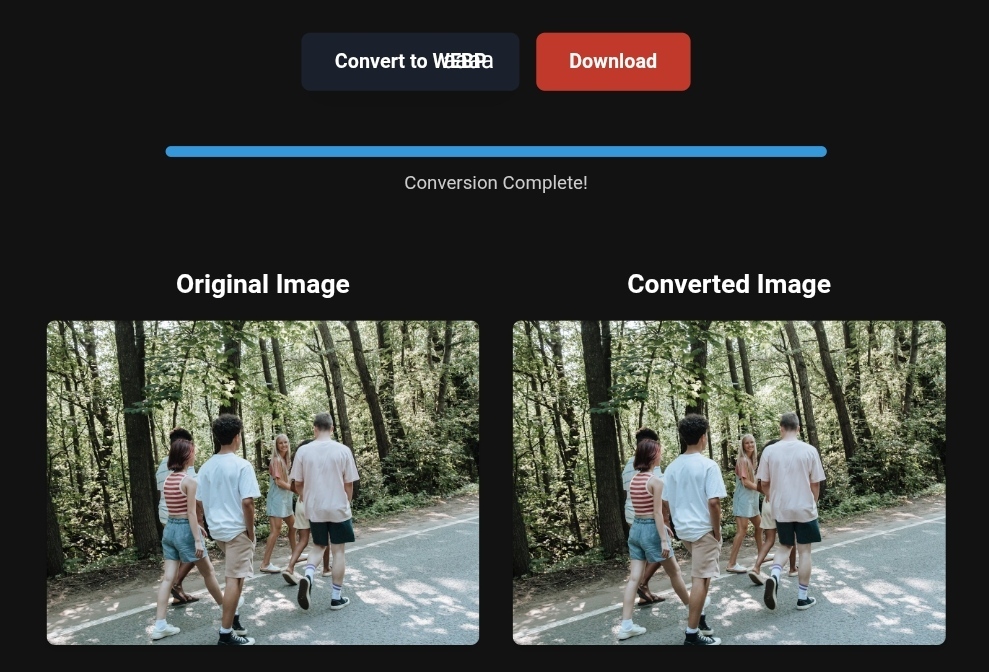
Enhanced tourist image from PNG to Webp.
A Picture Equals a Thousand Bookings: How Professional Photos Impact Travel Promotion
Did you know your photos might be costing you customers?
Imagine this scene: A traveler spends hours searching for the perfect dream destination. They arrive at your website, load the page… and the photos start appearing slowly. One is blurry, another is too large for their phone screen. After 7 seconds of waiting, they leave your site quickly and choose your competitor, who displays their images faster and more beautifully.
This isn’t just losing a random visitor—it’s losing a potential customer who was on the verge of booking.
In an era where SEO and website speed are crucial for Google rankings, ignoring the optimization of your travel photos means you’re letting your competitors beat you. But the good news is, the solution is simple and accessible, and you can apply it today with easy steps using tools like toolloopai.com—no technical experience needed.
In this comprehensive guide, we’ll show you how optimized professional photos affect your travel promotions and the real risks you face if you don’t take the right steps now.
Why Image Optimization is Crucial for Travelers (And Why Most Travel Sites Ignore It)
Site Speed: The Hidden Factor Costing You Half of Your Visitors
Today’s traveler is looking for a seamless, fast experience. According to the latest Google Core Web Vitals update for 2026, page load speed is now a major factor in search rankings. However, unoptimized images are the biggest enemy of this speed.
Let me break it down for you with numbers:
- A travel site with 20 high-quality images, each 5MB in size = 100MB to load on mobile devices.
- It could take more than 10 seconds to load this page on a 4G network.
- Over 50% of visitors will leave the site before the first image even appears.
The result? You’re losing half of your potential customers before they even see the beauty of your destination!
Image Clarity: When a Blurry Image Cancels a Booking
A professional photo isn’t just a pretty picture; it’s a persuasive tool that transports the traveler to their destination before they even arrive. But an unoptimized image that appears blurry or takes too long to load sends a negative message about the quality of your services.
The traveler will think, “If their photos are unclear, how will their services be?” With this simple doubt, you could lose a confirmed booking.
Mobile Compatibility: Where 85% of Travelers Plan Their Trips Today
The truth many overlook: Most travelers plan their trips on their phones while on the go. If your images aren’t mobile-friendly or require zooming in and out to view, you’re making the user experience difficult and uncomfortable.
This is where image formats like WebP and AVIF come in, ensuring fast loading and high quality across all devices.
Practical Tips for Transforming Travel Photos (Simple Steps That Change Everything)
🔄 A Simple Step: Convert PNG to WebP for Travel Images
Did you know that converting a single PNG image to WebP can reduce its size by up to 80% with no noticeable loss in quality?
Here’s what happens if you don’t do this:
- PNG images can be as large as 10MB → slow loading times
- WebP images of the same quality are only 2MB → instant loading
The simple solution: Use a tool like toolloopai.com to convert all your images at once. Just upload the images, select the desired format, and the tool takes care of the rest in seconds.
📦 Image Compression for Listings: Don’t Overdo It—Excessive Compression Ruins Beauty
Smart compression is the key to success. However, some sites make the mistake of over-compressing, causing images to lose detail and become unattractive.
Here’s the golden rule for compression based on image type:
| Image Type | Recommended Compression Rate |
|---|---|
| Landscapes & Beaches | 70-75% |
| Hotel Rooms & Suites | 75-80% |
| Food & Meals | 80-85% |
| Detailed Architecture | 80-85% |
🖼️ Image Formats: Which Format to Choose for Each Scenario?
| Format | Size | Quality | Recommended Use |
|---|---|---|---|
| AVIF | Very Small | Excellent | Best for all travel photos |
| WebP | Small | Very Good | Great alternative for cross-browser compatibility |
| JPEG | Medium | Good | For images that don’t need transparency |
| SVG | Very Small | Excellent | Ideal for logos, icons, and simple maps |
| PNG | Large | Excellent | For images requiring transparent backgrounds |
💡 Expert Tip: Use AVIF as your primary format and offer WebP as a fallback for older browsers to ensure optimal performance for all users.
Before and After: The Real Impact of Image Optimization (Numbers Don’t Lie)
Case Study: A Travel Site Promoting Tours in Turkey
Let me share a real example of a site that was suffering from extremely slow image loading times:
Before Optimization (Unoptimized PNG Images):
- ⏱️ Page load time: 9.7 seconds
- 📊 Page size: 52MB
- 💔 Bounce rate: 68%
- 🛒 Conversion rate to bookings: 1.1%
- 📉 Google ranking: Page 4
After Image Optimization (PNG to WebP + Smart Compression):
- ⏱️ Page load time: 1.8 seconds (81% improvement!)
- 📊 Page size: 7MB (86% decrease)
- 💚 Bounce rate: 34%
- 🛒 Conversion rate to bookings: 3.4%
- 📈 Google ranking: Page 1 (Position 3)
Final result: A 209% increase in bookings in just one month after optimizing the images!
Direct Impact on SEO
Optimized images send strong signals to Google that your site deserves higher rankings:
- 🚀 Improved LCP (Largest Contentful Paint) → Better ranking in search results
- 🔍 Appearance in Google Images → Additional source of free visitors
- ⏰ Lower bounce rate → Signals that the content meets the needs of searchers
- 📱 Improved Core Web Vitals → Full compliance with Google’s 2026 standards
Step-by-Step Guide for Image Conversion (Even If You’re Not a Tech Expert)
Step 1: Audit Your Current Image Library
Before starting, use Google PageSpeed Insights to analyze your site. It will provide a report with a list of images that need optimization.
Step 2: Use the Best Image Conversion Tools for Travel
To get professional results without complexity, use:
- toolloopai.com (for fast conversion and smart compression)
- Squoosh (from Google, free and straightforward)
- Adobe Photoshop (for full quality control)
Step 3: Convert PNG to WebP for Travel Images
Here’s how to convert using toolloopai.com:
- Visit the site and select “Convert Images.”
- Upload all your travel images (you can upload up to 50 at once).
- Choose the target format (WebP or AVIF).
- Set the desired quality (we recommend 80%).
- Click Convert and wait a few seconds.
- Download the optimized images and upload them to your site.
Step 4: Simple Tips for Mobile Image Optimization
- Use responsive images via the HTML element.
- Provide multiple formats for different browsers.
- Ensure that alt text is descriptive and accurate.
- Test your site on various mobile devices before finalizing.
Step 5: Add Alt Text Smartly
Alt text isn’t just a random string of words. Write a precise description that includes natural keywords. For example:
- ❌ Poor: “Hotel image”
- ✅ Good: “Panoramic view of Palm Beach hotel pool in Dubai”
What Image Conversion Tools Can’t Do (And When You Need an Expert)
Let’s be clear: Image conversion tools are great and powerful, but they’re not a magical solution for everything. Here’s where they fall short:
❌ They can’t fix poorly composed photos: If the original image is blurry, too dark, or poorly framed, WebP won’t turn it into a masterpiece. Professional photography remains the foundation of success.
❌ They can’t choose the right image automatically: The tool doesn’t know which angle of the resort shows off the best services or which beach photo appeals to a family traveler vs. an adventure traveler. Marketing expertise is indispensable.
❌ They can’t optimize alt text with marketing intelligence: Yes, some tools auto-generate alt text, but it’s usually generic and lacking value. Only you know the story you want to tell through each photo.
💡 The Optimal Solution: Combine technology and human creativity. Use toolloopai.com for the technical side (conversion, compression, optimization) and invest in human expertise for the marketing side (choosing, framing, storytelling). This blend builds a trustworthy brand that Google will consistently rank highly.
Based on the precise data provided, we can define the ideal criteria for selecting the best companies that meet travelers’ needs. The goal is not merely to choose an ordinary service, but to find one that ensures a safe, comfortable, and hassle-free journey.
✅Embark on Your Next Adventure with Viator and Start an Unforgettable Journey
Enjoy exceptional travel experiences with Viator, the perfect platform for discovering tours, activities, and adventures around the world. Whether you’re looking for a private tour in new york or an enriching cultural experience, Viator offers everything you need, complete with high-quality images and detailed information to help you savor every aspect of your adventure. With Viator, your dream destinations are just a step away—start your journey now and create memories that will last a: https://www.viator.com/New-York-City/d687-ttd?pid=P00293733&mcid=42383&medium=link
✅Related Technology: High-Quality Image Capture
If you’re working on digitizing old photos or creating digital assets from film negatives, starting with high-quality scans ensures your final optimized images retain maximum detail.
👉 Check the 22MP Slide Scanner on AliExpress: https://s.click.aliexpress.com/e/_c4VFbg55
✅Are you ready to take your business to the next level? Whether you’re an entrepreneur, small business owner, or digital marketer, there are smart tools that can turn your ideas into real profits!
By integrating high-quality images with a reliable platform like Spocket, you can transform your dropshipping store into a premium shopping experience, increasing your chances of real profits. Don’t waste time searching for complicated solutions—try Spocket now and start offering professional images for your products to ensure your success!
👉 Check supplier requirements on Spocket: https://get.spocket.co/e8z1port3g11
Products are chosen independently by us. Purchases made through our links may earn us a commission at no additional cost to you.
FAQ About Optimizing Travel Photos
Q: Does converting PNG to WebP affect the image quality for visitors?
A: Don’t worry, WebP provides excellent quality at a much smaller size. In most cases, visitors won’t notice a quality difference but will notice a huge improvement in loading speed. For best results, use a compression rate of 75-80%.
Q: How many images should I have on a travel destination page?
A: Quality is more important than quantity. 10 to 15 high-quality, optimized images are better than 50 average ones. Focus on:
- A general shot of the location
- Details of rooms/services
- Food photos (if there’s a restaurant)
- Available activities
- Panoramic views
Q: How can I ensure my images are compliant with Google Core Web Vitals 2026?
A: Use Google PageSpeed Insights for free. It will provide you with a detailed report on your images’ performance and their compliance score. The LCP (Largest Contentful Paint) should load in under 2.5 seconds, and the FID (First Input Delay) should be under 100 milliseconds.
Q: What’s the difference between WebP and AVIF, and which is better for travel images?
A: AVIF is the newest and technically superior format, offering 30% better compression than WebP, with even higher quality. However, WebP is supported in 97% of modern browsers. The optimal solution: use AVIF as the primary format and WebP as a fallback for older browsers.
Q: Can I optimize free images using toolloopai.com?
A: Yes, toolloopai.com offers free options for converting and compressing images with high quality, as well as paid plans for large-scale projects and bulk conversions. Start with the free version and see the difference yourself.
Conclusion: Optimized Images are an Investment, Not a Cost
In the travel industry, you’re not just selling a room or a ticket; you’re selling a dream and an unforgettable experience. And images are the bridge that takes this dream from the traveler’s imagination to a booking decision.
Remember these facts before you finish reading:
- 🚀 Site speed impacts your Google ranking and half of your visitors.
- 💚 Optimized images can reduce bounce rates by up to 50%.
- 🛒 Image optimization increases booking conversion rates by 2-3 times.
- 🔍 Modern formats like WebP and AVIF reduce page size by 80%.
The good news is, the solution is right at your fingertips. You don’t need technical expertise or a big budget. Just start today by converting your first 5 key images on your site using toolloopai.com, and watch how your site’s speed, ranking, and bookings improve in the coming days.
Don’t wait for your competitors to do it first. Get ahead now.
🎯 Immediate Action: Open your browser now, go to toolloopai.com, and convert your first travel image on your site to WebP. You’ll be amazed at the difference.
Author Bio
R hallou | Founder & Head Expert, Writer at toolloopai
Toolloopai.com specializes in generating and optimizing images using artificial intelligence for websites and individuals looking for high-quality photos to use in any activity.
With years of experience in SEO and image conversion, Nasser provides practical insights for travel marketers and website owners who want to improve their performance and increase bookings through professional, optimized photos.
🔗 Visit: www.toolloopai.com
One Comment